Skip to content

AI Paparazzi Video Generator: Your Celebrity Entrance

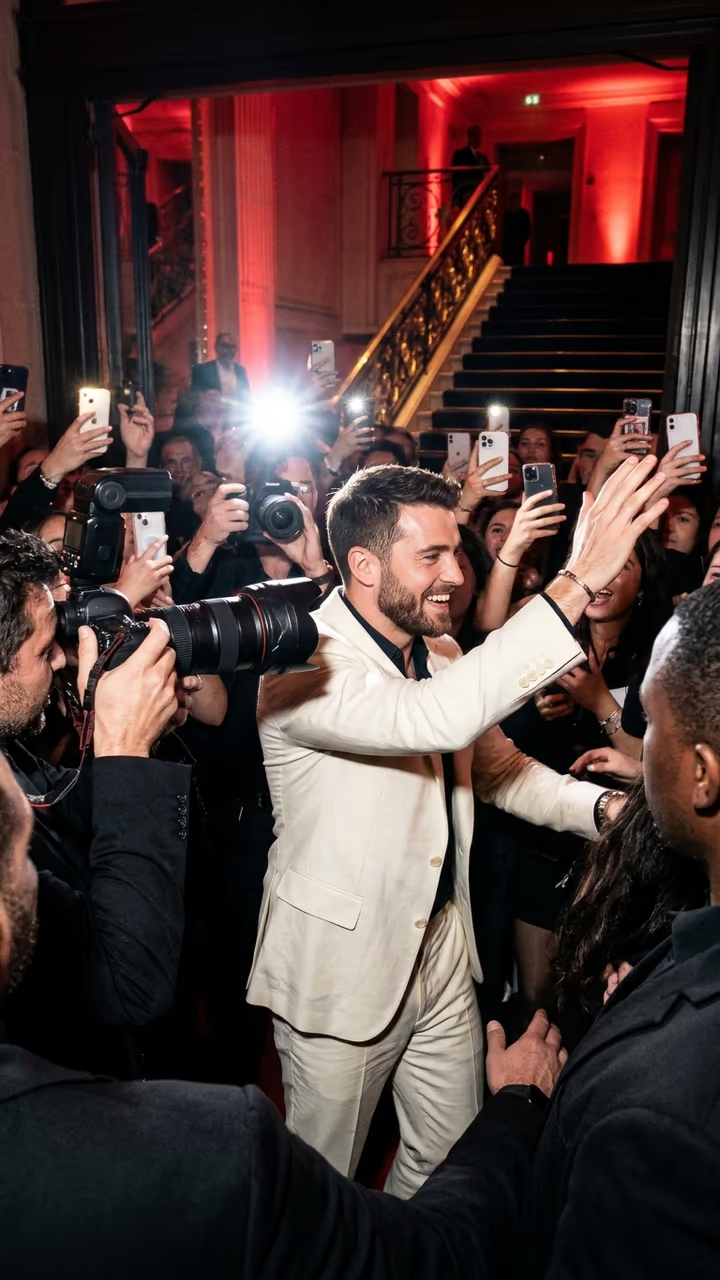
Upload one photo and you walk into a red-lit venue like a star: photographers with huge lenses, fans holding up phones, flashes everywhere, all for you.

Paparazzi Video · switch effect

Your photo

One adult, face clear, waist-up, no sunglasses. Wear what you want to arrive in.

Cost shown before you run · failed runs are refunded

  • Ready in 1–3 min
  • No watermark
  • Failed runs refunded
  • Uploads never published

This trend on Instagram & TikTok

The most-watched videos of this trend, shown with credit and a link to each original post. Videos belong to their creators; they were not made with Soracai.

  1. 1

    @chillingduck1607

    Higgsfield remake

    Higgsfield

    1,785 views · 750 likes · October 8

    Paparazzi-entrance remake

    Watch on Higgsfield ↗
  2. 2

    @gothicflamingo2329

    Higgsfield remake

    Higgsfield

    4 views · 0 likes · October 28

    Paparazzi-entrance remake

    Watch on Higgsfield ↗
  3. 3

    @degaswater2356

    Higgsfield remake

    Higgsfield

    2 views · 0 likes · October 28

    Paparazzi-entrance remake

    Watch on Higgsfield ↗
  4. 4

    @creatingmoon1791

    Higgsfield remake

    Higgsfield

    2 views · 0 likes · October 28

    Paparazzi-entrance remake

    Watch on Higgsfield ↗
  5. 5

    @berserberk

    Higgsfield remake

    Higgsfield

    0 views · 0 likes · October 28

    Paparazzi-entrance remake

    Watch on Higgsfield ↗

How to use the AI Paparazzi Video Generator: Your Celebrity Entrance

  1. 01

    Upload a photo

    Your photo: One adult, face clear, waist-up, no sunglasses. Wear what you want to arrive in..

  2. 02

    Press Generate

    The Paparazzi Video effect runs on its own tuned settings. It costs 300 credits, shown on the button before you run it.

  3. 03

    Download

    Your video is ready in one to three minutes. Download the MP4 without a watermark.

What is the AI Paparazzi Video Generator: Your Celebrity Entrance?

The paparazzi trend is pure fantasy fame: you walk into a red-lit event, and the whole room turns. Photographers push forward with giant lenses, fans hold up their phones, someone shouts your name, and you wave like you have done this a thousand times. The clip people copy is a real celebrity arrival filmed from inside the crowd, and in October 2026 it became a community template on Higgsfield where people put themselves in the star's place.

This template does the same from one photo. The model gets the 15-second arrival clip and your picture and redoes it shot for shot: the red light, the staircase and gold railing, the cameras in your face, the handshake and the wave, with you at the centre. You keep your own face, hair and outfit, so wear what you would want to be photographed in.

The result is a 15-second vertical video with the original sound of the clip, ready for TikTok, Reels and Shorts, with no watermark. It works as a birthday "main character" post, a launch-day joke for a creator or a small business, or just a flex for the group chat. The example videos on this page are credited to their creators on Higgsfield; the poster image is AI-generated.

How the recast works

Most photo-to-video templates start from one picture and invent the motion. This one starts from the trend clip itself: the model gets the original video and your photo, and redoes the clip shot for shot with you in it. That is why the camera, the cuts and the timing match the trend so closely. The model's own audio tends to drift, so once the video is ready we put the clip's original sound back on; the picture is untouched.

About the people in the crowd

The original clip is a real arrival. The template replaces the star with you and keeps the crowd as generic, unrecognisable people, so nobody real ends up in your video. Only upload your own photo or a photo of an adult who agreed.

AI Paparazzi Video Generator: Your Celebrity Entrance FAQ

How do I make the AI paparazzi video?

Upload one clear photo of yourself and press Generate. You get a 15-second vertical clip of you arriving at a red-lit event while photographers and fans crowd around you.

Does the video have sound?

Yes. The clip's original sound plays under it, lined up with the arrival.

Can I use a photo of a real celebrity?

No. Only upload photos of yourself or adults who agreed to be in the video, and don't present the result as real footage of anyone.

Is this the Higgsfield template?

It is the same idea. The celebrity paparazzi entrance clip became a community "make your version" template on Higgsfield in October 2026, where people swap themselves into the clip. This page makes the same recast on Soracai. Soracai is not affiliated with Higgsfield; the example videos on this page are credited to their Higgsfield creators.

How long does it take?

About 10 to 15 minutes, because the model redoes the whole trend clip frame by frame. You can leave the page; the video is saved to your Creations when it is ready.

Is it free?

Video templates use paid credits. New accounts get free credits for photo templates only. The exact cost is shown on the Generate button before you confirm.

Is there a watermark?

No watermark is added to the video.

Where is my photo stored?

Uploads are stored in Firebase Storage (Google Cloud) under your account so the run can happen and the result appears in Creations. They are not public, and you can email support to request deletion. To run the effect, a copy is sent to our AI model provider (kie.ai); result files are kept for 14 days, so download what you want to keep.

More AI effects

Try the AI Paparazzi Video Generator: Your Celebrity Entrance

Upload a photo and get your video in a couple of minutes.

Upload photo