
What is the AI Puppy Generator?
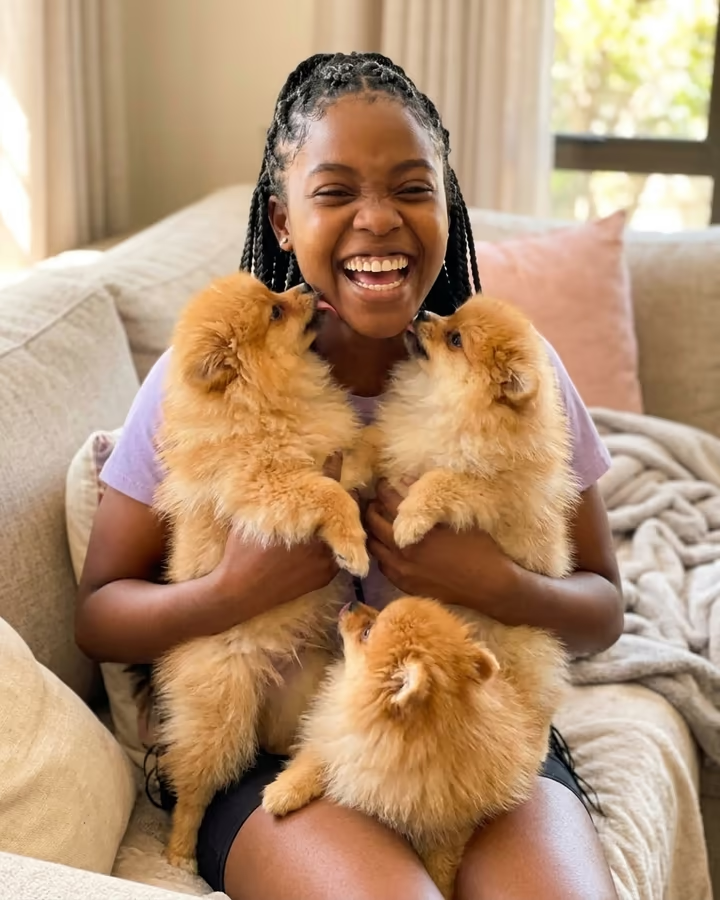
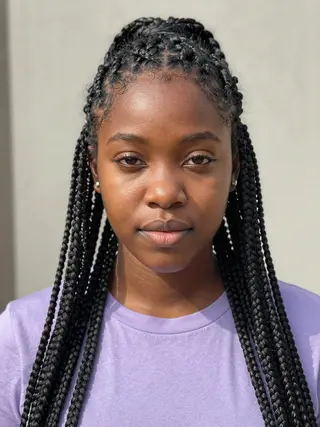
The AI puppy generator puts you on a sofa with a lap full of puppies. Upload a selfie and the template returns a warm, candid-looking photo of you laughing while three fluffy Pomeranian puppies climb over your lap and lick your face. It is styled like a quick phone snapshot a friend took, not a studio shoot, which is what makes it feel believable and a little ridiculous at the same time.
Puppy photos have always done well on social media, and as image models got better at keeping a person's face consistent, a wave of AI pet trends followed in 2025: pets as humans, pets as figurines, and people surrounded by animals they do not own. The puppy-pile photo is the simplest version of that idea. You do not need a pet, a breeder visit or a patient photographer; you need one clear selfie.
This page is a port of the AI puppy generator template soracai already ran, now as a one-step tool. Pomeranians are the default because their round, fluffy shape reads as a puppy instantly, but you can ask for another breed or a different setting in the text box. Your face, identity and skin tone are kept as in your photo. The puppies are generated by the model, not real animals from a breeder or shelter. Photo templates take roughly 20 to 40 seconds, and new accounts can try this one with their free credits.
Why it looks like a real snapshot
The prompt asks for warm indoor light and a candid smartphone look on purpose. Studio-perfect pet photos look staged; a slightly imperfect phone shot of someone mid-laugh with puppies everywhere looks like a moment a friend caught. The sofa setting does the same job, since it is familiar and does not compete with the puppies.
Your face is the anchor. The template keeps your identity and skin tone as in the upload, so the people who know you will recognize you right away. If the face drifts, try a sharper selfie with even light.
Trying other breeds and scenes
Pomeranians are the default because they are small, round and fluffy, which makes them read as puppies at a glance. The text box lets you swap that. Shorter coats like beagles or labs look more realistic up close, while very fluffy breeds look more playful.
You can also move the scene: a picnic blanket, a bed with white sheets, a snowy porch for the holidays. Keep the description short. One breed and one place is usually enough for the model to build a coherent photo that still looks like a candid snapshot.