Skip to content

Christmas Photobooth AI: Your Own Black-and-White Holiday Photo Strip

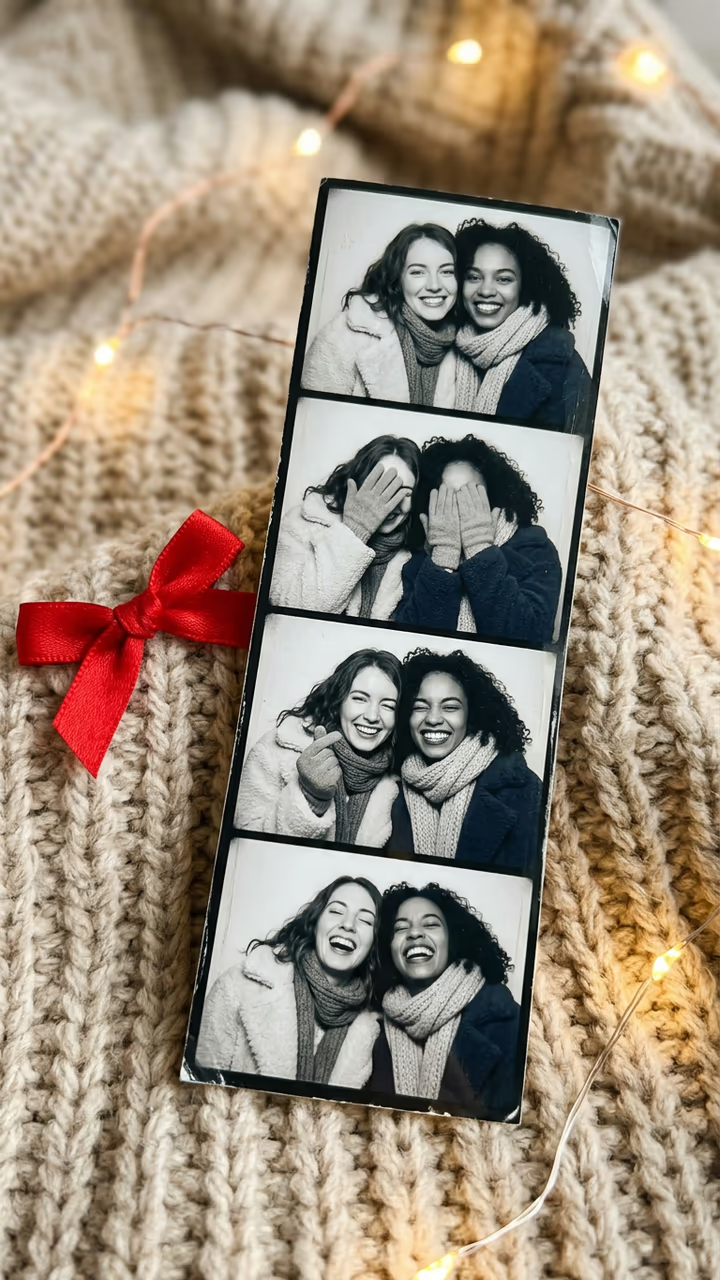
From one photo of you (and one of a friend or partner if you like), get the viral Christmas photobooth strip: four black-and-white booth photos of you in winter coats and scarves, a different cute pose in every frame, lying on a cozy blanket with fairy lights.

Christmas Photobooth · switch effect

Your photo

One adult, chest up, face clear and toward the camera, in good light.

Friend or partner (optional) (optional)

One adult who agreed to it, chest up and face clear. Leave empty for a solo strip.

Cost shown before you run · failed runs are refunded

  • Ready in ~15 s
  • No watermark
  • Failed runs refunded
  • Uploads never published

This trend on Instagram & TikTok

The most-watched videos of this trend, shown with credit and a link to each original post. Videos belong to their creators; they were not made with Soracai.

  1. 1

    @fromliayoon

    Trend video

    TikTok

    3.48M views · 669K likes · November 7

    “Cutest photobooth trend for the holidays”: 3.5M

    Watch on TikTok ↗
  2. 2

    @fromliayoon

    Trend video

    TikTok

    1.15M views · 161K likes · November 8

    The second take, filmed inside the booth

    Watch on TikTok ↗
  3. 3

    @lameloxdd

    Trend video

    TikTok

    873K views · 122K likes · November 8

    The couple version on a colour strip

    Watch on TikTok ↗

How to use the Christmas Photobooth AI: Your Own Black-and-White Holiday Photo Strip

  1. 01

    Upload your photos

    Your photo: One adult, chest up, face clear and toward the camera, in good light.. Friend or partner (optional): One adult who agreed to it, chest up and face clear. Leave empty for a solo strip..

  2. 02

    Press Generate

    The Christmas Photobooth effect runs on its own tuned settings. It costs 10 credits, shown on the button before you run it.

  3. 03

    Download

    Your photo is ready in about 15 seconds. Download it without a watermark.

AI Holiday Effects

What is the Christmas Photobooth AI: Your Own Black-and-White Holiday Photo Strip?

The Christmas photobooth trend is back for the holidays: a slow phone shot along a black-and-white photo booth strip of two friends in fluffy winter coats, one cute pose per frame, with a line of a Christmas song over each photo. Upload one photo, add a friend or partner if you want, and this template makes the strip for you, no booth needed.

The format first went big in December 2025, when @paige_go posted a strip from an event photo booth with one pose per line of a Christmas song; it has 2.9 million views. It came back right on cue a year later. On 7 November 2026 the Korean creator @fromliayoon posted "Cutest photobooth trend for the holidays", two black-and-white strips of her and a friend, and it passed 3.4 million views and 669,000 likes within a week. Her second take, filmed inside the booth, added 1.1 million, and a couple's colour-strip take by @lameloxdd passed 870,000 views, which made the couple version popular too.

The template runs on Nano Banana 2 and returns a vertical photo of a four-frame strip lying on a cozy blanket with fairy lights: your own face in every frame, four different poses, no watermark and no prompt to copy. Add the song lines as text in TikTok when you post. The trend videos on this page are credited to their creators; the poster image is AI-generated.

What you get

A vertical photo of a black-and-white photo booth strip on a beige knit blanket with fairy lights. The strip has four frames: you (and your friend, if you add one) in winter coats and scarves, smiling cheek to cheek, hiding your faces, winking with a finger heart and laughing.

Solo or with a friend

With one photo you get a solo strip. Add a second photo and the two of you share every frame, like the original best-friend and couple posts.

Which photos to use

Adults only, one person per photo, chest up, face clear and toward the camera. Use your own photo or one of someone who said yes.

Christmas Photobooth AI: Your Own Black-and-White Holiday Photo Strip FAQ

How do I do the Christmas photobooth trend with AI?

Upload one clear photo, add a second one for a duo strip if you like, and press Generate. You get a vertical photo of a four-frame black-and-white booth strip with you in it.

Is it free?

New accounts get free credits for photo templates, so you can try it at no cost. More runs use credits from a pack or plan, and the cost is shown before you generate.

Does the strip include the song lyrics?

No. The photos come without text so you can add the song line you want as a caption in TikTok or Instagram when you post.

Is this affiliated with the creators of the trend?

No. Soracai is not affiliated with @fromliayoon, TikTok, any photo booth company or any creator shown on this page. "Christmas photobooth" is the name of the trend, used because that is what people search for.

Is there a watermark?

No. Images download without a watermark.

Where is my photo stored?

Uploads are stored in Firebase Storage (Google Cloud) under your account so the run can happen and the result appears in Creations. They are not public, and you can email support to request deletion. To run the effect, a copy is sent to our AI model provider (kie.ai); result files are kept for 14 days, so download what you want to keep.

More AI effects

Try the Christmas Photobooth AI: Your Own Black-and-White Holiday Photo Strip

Upload two photos and get your photo in seconds.

Upload photos