Skip to content

Baby Face Filter AI: Get the Viral Doll Baby Face From One Photo

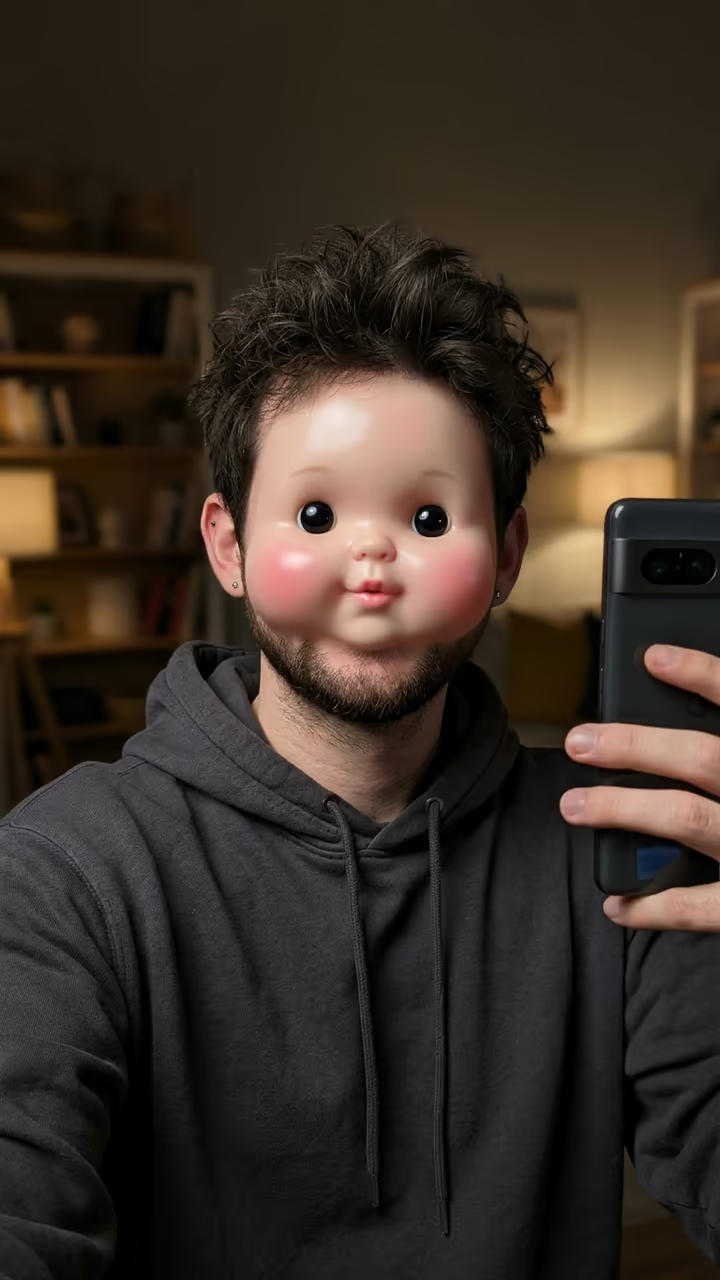
Upload one photo of yourself (or your pet) and get the doll baby face everyone is posting: tiny glossy black eyes, huge puffy round cheeks, a little flat nose and a tiny mouth, while your hair, clothes, pose and background stay exactly the same.

Baby Face Filter AI · switch effect

Your photo

One adult (or your pet), face clear and toward the camera, in good light. Never a photo of a child.

Cost shown before you run · failed runs are refunded

  • Ready in ~15 s
  • No watermark
  • Failed runs refunded
  • Uploads never published

This trend on Instagram & TikTok

The most-watched videos of this trend, shown with credit and a link to each original post. Videos belong to their creators; they were not made with Soracai.

  1. 1

    @b00gerw00ger

    Trend video

    TikTok

    79K views · 27K likes · November 17

    “Hey mama, hi!”: the baby face filter on a selfie, 79k

    Watch on TikTok ↗
  2. 2

    @chrisluvsrivals

    Trend video

    TikTok

    62K views · 511 likes · September 16

    “Filter is named ggg11”: the lens on its first big post

    Watch on TikTok ↗

How to use the Baby Face Filter AI: Get the Viral Doll Baby Face From One Photo

  1. 01

    Upload a photo

    Your photo: One adult (or your pet), face clear and toward the camera, in good light. Never a photo of a child..

  2. 02

    Press Generate

    The Baby Face Filter AI effect runs on its own tuned settings. It costs 10 credits, shown on the button before you run it.

  3. 03

    Download

    Your photo is ready in about 15 seconds. Download it without a watermark.

What is the Baby Face Filter AI: Get the Viral Doll Baby Face From One Photo?

Tiny black eyes, cheeks like two bread rolls, a button nose and a mouth the size of a pea: the baby face filter is the funniest face on TikTok this November. Upload one photo of yourself or your pet and this template gives you the same doll baby face, with your hair, clothes and background left exactly as they were.

The look comes from a Snapchat lens called ggg11. On 16 September 2026 @chrisluvsrivals posted it on himself with the caption "filter is named ggg11", and a few collage clips followed. The wave broke in November, when people put the lens on famous film, TV and streaming moments: on 11 November a "I AM A BABY" clip by @tristanthetyranika passed 5 million views, a streamer clip from 15 November passed 9 million, and #babyfacefilter climbed past 38 million views. Know Your Meme added it on 17 November as the Cabbage Patch Kid / Baby Face Filter, so people also search for a Cabbage Patch filter.

You do not need Snapchat or the lens. An image model redraws only your face into the doll baby look and keeps the rest of the photo. It is made for adults and pets: never upload a photo of a child. The trend videos on this page are credited to their creators; the poster image is AI-generated.

What changes and what stays

Only the face changes: tiny black eyes, puffy round cheeks, a flat button nose and a tiny mouth with smooth doll-like skin. Your hair, ears, clothes, pose, background and light stay the same.

Is this the ggg11 Snapchat lens?

No. It is an AI image edit that gives the same look from any photo, with no app or lens needed. "Baby face filter", "ggg11" and "Cabbage Patch filter" are the names people search for.

Which photo to use

One adult or one pet, face clear and toward the camera, in good light. Use your own photo or one of a friend who said yes, never a celebrity, a stranger or a child.

Baby Face Filter AI: Get the Viral Doll Baby Face From One Photo FAQ

How do I get the baby face filter?

Upload one clear photo of your face and press Generate. You get the same photo with the doll baby face: tiny black eyes, puffy cheeks and a button nose.

Is it free?

New accounts get free credits for photo templates, so you can try it at no cost. More runs use credits from a pack or plan, and the cost is shown before you generate.

Can I use the baby face filter without Snapchat?

Yes. This template works in the browser from any photo you already have; no Snapchat account or lens is needed.

Can I use a photo of a child?

No. The template is for adults and pets only, and photos of children are not allowed.

Is this affiliated with Snapchat or Cabbage Patch Kids?

No. Soracai is not affiliated with Snap Inc., Snapchat, the ggg11 lens creator, Cabbage Patch Kids, Know Your Meme, TikTok or any creator mentioned on this page. "Baby face filter" is the name of the trend, used because that is what people search for.

Is there a watermark?

No. Images download without a watermark.

Where is my photo stored?

Uploads are stored in Firebase Storage (Google Cloud) under your account so the run can happen and the result appears in Creations. They are not public, and you can email support to request deletion. To run the effect, a copy is sent to our AI model provider (kie.ai); result files are kept for 14 days, so download what you want to keep.

More AI effects

Try the Baby Face Filter AI: Get the Viral Doll Baby Face From One Photo

Upload a photo and get your photo in seconds.

Upload photo