
Skip to content

Christmas Princess AI Trend: Step Out of the Crystal Carriage

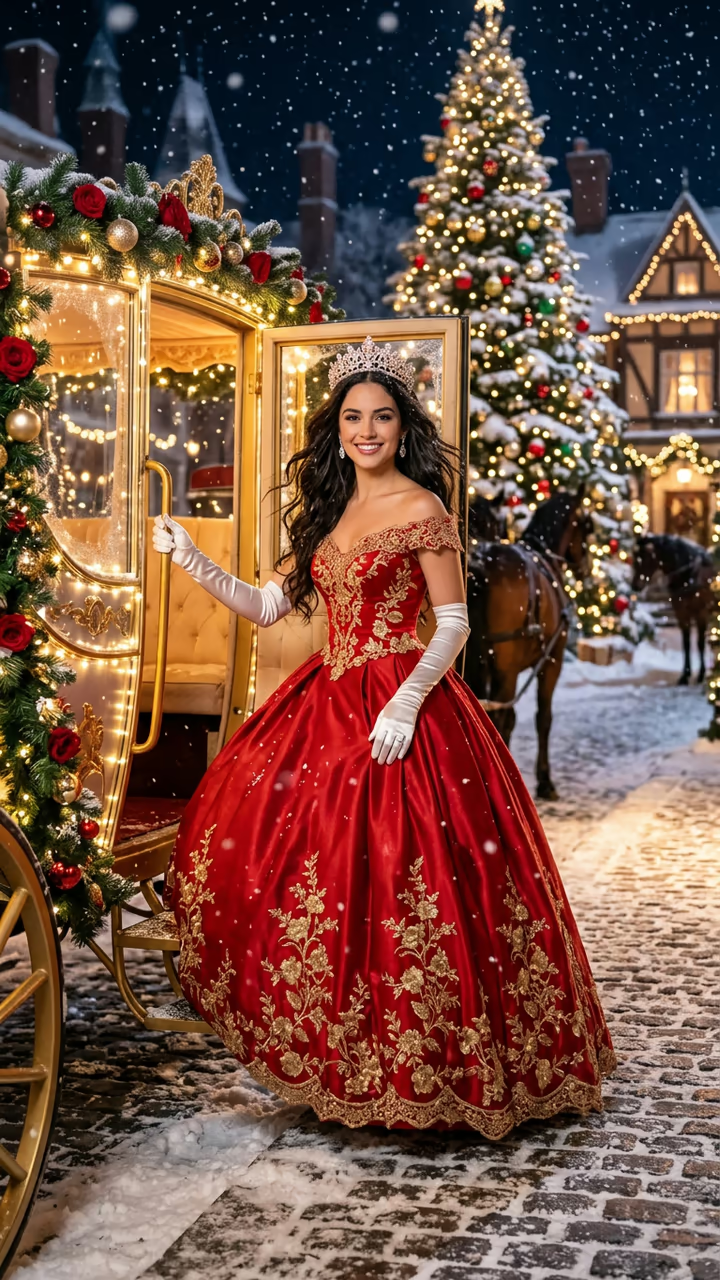
From one photo, you step out of a glowing crystal carriage on a snowy Christmas night in a red satin ball gown with gold embroidery, a tiara and long white gloves, then spin and smile at the camera: the viral Christmas princess template, with you (or your pet) as the princess or prince.

Christmas Princess Carriage · switch effect

Your photo or your pet

One adult, chest up or closer, face clear and toward the camera, no sunglasses or hat; or your own cat or dog. The gown, tiara and gloves come from the template.

Cost shown before you run · failed runs are refunded

  • Ready in 1–3 min
  • No watermark
  • Failed runs refunded
  • Uploads never published

This trend on Instagram & TikTok

The most-watched videos of this trend, shown with credit and a link to each original post. Videos belong to their creators; they were not made with Soracai.

  1. 1

    @m52e0cw9o3

    Trend video

    TikTok

    817K views · 13K likes · November 4

    Red gown and crystal carriage: 817K

    Watch on TikTok ↗
  2. 2

    @migf149

    Trend video

    TikTok

    641K views · 13K likes · November 6

    The silver gown version: 641K

    Watch on TikTok ↗
  3. 3

    @krjxejaig5

    Trend video

    TikTok

    104K views · 2,112 likes · November 4

    How to make the Christmas princess: 104K

    Watch on TikTok ↗

How to use the Christmas Princess AI Trend: Step Out of the Crystal Carriage

  1. 01

    Upload a photo

    Your photo or your pet: One adult, chest up or closer, face clear and toward the camera, no sunglasses or hat; or your own cat or dog. The gown, tiara and gloves come from the template..

  2. 02

    Press Generate

    The Christmas Princess Carriage effect runs on its own tuned settings. It costs 140 credits, shown on the button before you run it.

  3. 03

    Download

    Your video is ready in one to three minutes. Download the MP4 without a watermark.

AI Holiday Effects

What is the Christmas Princess AI Trend: Step Out of the Crystal Carriage?

The Christmas princess trend is November's fairytale template: a red sparkling heel steps out of a glowing crystal carriage onto the snow, the camera rises over a red satin ball gown with gold embroidery, and you turn around in a tiara and long white gloves under the Christmas lights. Upload one photo and this template makes you the princess, or the prince, or turns your pet into Christmas royalty.

The trend is a CapCut AI template that took off in the first week of November 2026, mostly with Spanish captions ("princesa navideña"). On 4 November @krjxejaig5 posted a how-to that passed 100,000 views, and the same day @m52e0cw9o3 posted two takes of the template with a caption describing the red satin gown, the tiara and the carriage: 817,000 views. A silver-gown version by @migf149 followed on 6 November with 641,000 views, and #christmasprincess now holds 2.6 million views, weeks before the Christmas peak.

The template runs in two steps: an image model dresses you in the gown in front of the carriage, then a video model plays 8 seconds of the step-out, a slow spin and a close-up smile, with sleigh bells and an original orchestral melody. The trend videos on this page are credited to their creators; the poster image is AI-generated.

What happens in the video

0-2.5 s: a red sparkling heel steps out of a crystal carriage onto the snow. 2.5-5 s: you stand in the red ball gown, tiara and gloves and turn in a slow spin. 5-8 s: the camera pushes in to a close-up of your smile.

Princess, prince or pet?

The template follows your photo: women get the red satin gown and tiara, men a red velvet prince's coat and crown, and pets keep their own fur and wear the royal look.

Which photo to use

One adult with the face clear and toward the camera, or your own cat or dog. Use your own photo or one of someone who said yes, never a celebrity, a stranger or a child.

Christmas Princess AI Trend: Step Out of the Crystal Carriage FAQ

How do I make the Christmas princess video with AI?

Upload one clear photo and press Generate. You get an 8-second vertical clip of you stepping out of a crystal carriage in a red ball gown and tiara on a snowy Christmas night.

Is it free?

Video templates use paid credits. New accounts get free credits for photo templates only. The exact cost is shown on the Generate button before you confirm.

Can I make it for my child?

No. Soracai does not take photos of children. Make it with your own photo, an adult who said yes, or your pet.

Can I use a photo of my cat or dog?

Yes. Your pet steps out of the carriage as Christmas royalty, keeping its own fur and markings.

Is this affiliated with CapCut or the creators of the trend?

No. Soracai is not affiliated with CapCut, ByteDance, TikTok or any creator shown on this page. "Christmas princess" is the name of the trend, used because that is what people search for.

Is there a watermark?

No watermark is added to the video.

Where is my photo stored?

Uploads are stored in Firebase Storage (Google Cloud) under your account so the run can happen and the result appears in Creations. They are not public, and you can email support to request deletion. To run the effect, a copy is sent to our AI model provider (kie.ai); result files are kept for 14 days, so download what you want to keep.

More AI effects

Try the Christmas Princess AI Trend: Step Out of the Crystal Carriage

Upload a photo and get your video in a couple of minutes.

Upload photo