

Skip to content

Welcome to My Page AI: The Scrapbook Intro Video From One Photo

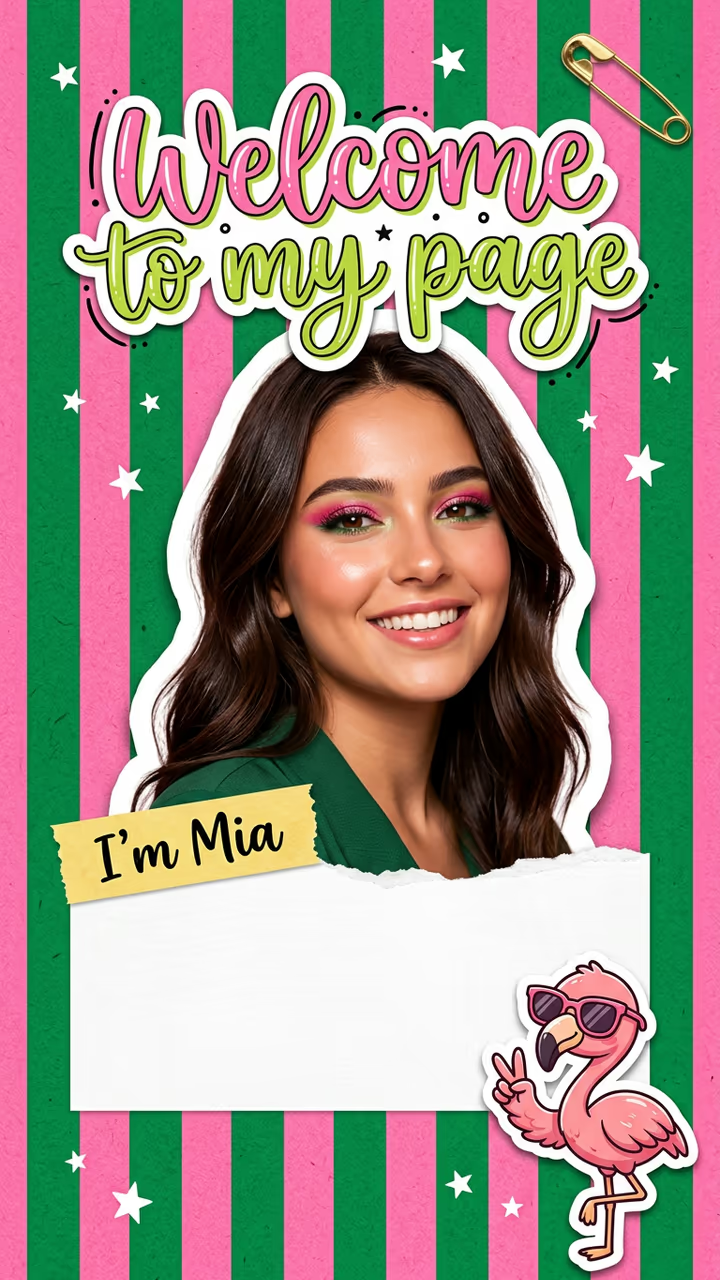
From one photo, you appear as a cut-out sticker on a pink and green striped scrapbook page, the words "Welcome to my page" pop in above you, a name label reads "I'm" and your name, and a sunglasses sticker waves a peace sign.

Welcome to My Page AI · switch effect

Your photo

One adult, head and shoulders or waist up, face clear and toward the camera, in good light.

Cost shown before you run · failed runs are refunded

  • Ready in 1–3 min
  • No watermark
  • Failed runs refunded
  • Uploads never published

This trend on Instagram & TikTok

The most-watched videos of this trend, shown with credit and a link to each original post. Videos belong to their creators; they were not made with Soracai.

  1. 1

    @joywithkelina

    Trend video

    TikTok

    2.84M views · 227K likes · November 15

    “How stinking cute is this”: 2.8M

    Watch on TikTok ↗
  2. 2

    @_mercy.xxx

    Trend video

    TikTok

    765K views · 164K likes · November 17

    “Nice meeting y'all again”: 765K

    Watch on TikTok ↗

How to use the Welcome to My Page AI: The Scrapbook Intro Video From One Photo

  1. 01

    Upload a photo

    Your photo: One adult, head and shoulders or waist up, face clear and toward the camera, in good light.. Your name (optional): Short first name or nickname, e.g. Mia. Leave empty for no name label..

  2. 02

    Press Generate

    The Welcome to My Page AI effect runs on its own tuned settings. It costs 140 credits, shown on the button before you run it.

  3. 03

    Download

    Your video is ready in one to three minutes. Download the MP4 without a watermark.

AI Portrait Effects

What is the Welcome to My Page AI: The Scrapbook Intro Video From One Photo?

"Welcome to my page" is the creator intro of November 2026: you appear as a cut-out sticker on a pink and green striped scrapbook page, a hand-lettered "Welcome to my page" writes itself in above you, a strip of yellow tape says "I'm" and your name, and a sunglasses sticker waves a peace sign. Upload one photo, type your name and this template makes yours.

The format is a CapCut template, and it spread because it does a job: people use it as a first post, a pinned intro or a hello after a break. On 15 November @joywithkelina posted hers with "How stinking cute is this" and passed 2.8 million views and 226,000 likes. Two days later @_mercy.xxx used it to say "nice meeting y'all again" and reached 765,000 views, and tutorial and "bienvenue sur ma page" posts followed in English and French. Template sites added a Welcome to my page page the same week.

The template runs in two steps: an image model builds the scrapbook page with you as the cut-out, the script title and your name label, then a video model animates it for 8 seconds, the cut-out popping in, the title writing itself and you coming alive like a live photo, with a cute original tune. The trend videos on this page are credited to their creators; the poster image is AI-generated.

What happens in the video

The page starts with bold pink and green stripes, a gold safety pin and little stars. Your cut-out photo pops in with a white sticker border, "Welcome to my page" writes itself in at the top, and you come alive inside the cut-out with a head tilt and a smile. Then a strip of yellow tape slides in with "I'm" and your name, and a flamingo sticker in sunglasses waves a peace sign.

Which photo to use

One adult, face clear and toward the camera, head and shoulders or waist up, in good light. Use your own photo or one of a friend who said yes.

Welcome to My Page AI: The Scrapbook Intro Video From One Photo FAQ

How do I make the Welcome to my page video with AI?

Upload one clear photo, type your name if you want the name label, and press Generate. You get an 8-second vertical scrapbook intro with you as the cut-out, the script title, your name and the stickers.

Can I leave the name out?

Yes. Leave the name box empty and the tape label stays blank.

Is it free?

Video templates use paid credits. New accounts get free credits for photo templates only. The exact cost is shown on the Generate button before you confirm.

Does the video have sound?

Yes: soft paper and sticker sounds and a cute original tune. It is not the trend's original sound; you can add that in TikTok or CapCut when you post.

Where did the Welcome to my page trend come from?

It is a CapCut template that took off in mid-November 2026. @joywithkelina's post on 15 November passed 2.8 million views, and @_mercy.xxx's on 17 November passed 765,000.

Is this affiliated with CapCut, TikTok or the creators in the trend?

No. Soracai is not affiliated with CapCut, TikTok or any creator mentioned on this page. "Welcome to my page" is the name of the trend, used because that is what people search for.

Is there a watermark?

No watermark is added to the video.

Where is my photo stored?

Uploads are stored in Firebase Storage (Google Cloud) under your account so the run can happen and the result appears in Creations. They are not public, and you can email support to request deletion. To run the effect, a copy is sent to our AI model provider (kie.ai); result files are kept for 14 days, so download what you want to keep.

More AI effects

Try the Welcome to My Page AI: The Scrapbook Intro Video From One Photo

Upload a photo and get your video in a couple of minutes.

Upload photo