

Skip to content

AI Window Peeper Filter Video

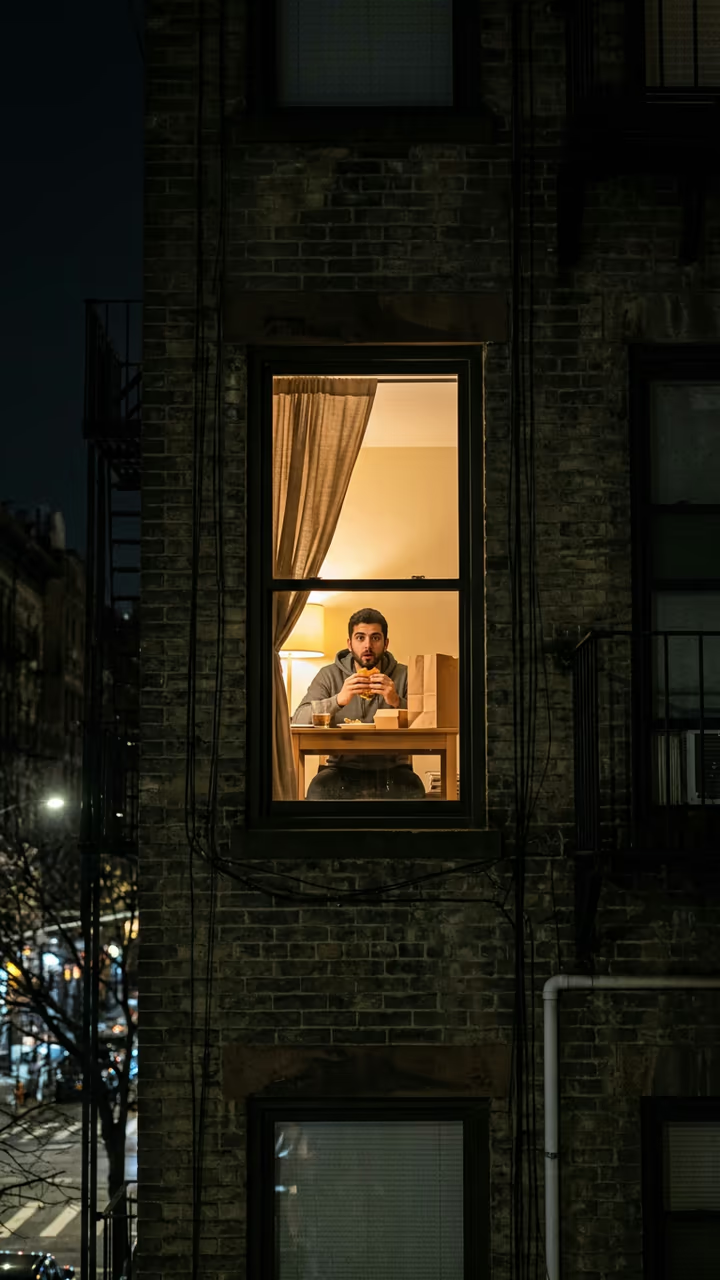
The camera creeps up to one lit window at night, you are inside eating a burger, you freeze mid-bite, stare straight back, get up and pull the curtain shut: the window peeper filter with your own face.

Window Peeper Filter · switch effect

Your photo

One adult, face clear, upper body. Your face, hair and clothes go into the window scene.

Cost shown before you run · failed runs are refunded

  • Ready in 1–3 min
  • No watermark
  • Failed runs refunded
  • Uploads never published

This trend on Instagram & TikTok

The most-watched videos of this trend, shown with credit and a link to each original post. Videos belong to their creators; they were not made with Soracai.

  1. 1

    @vkiutrinh5179

    Trend video

    TikTok

    168K views · 2,680 likes · October 21

    “Try this filter yourself”: caught eating a burger in the window

    Watch on TikTok ↗

How to use the AI Window Peeper Filter Video

  1. 01

    Upload a photo

    Your photo: One adult, face clear, upper body. Your face, hair and clothes go into the window scene..

  2. 02

    Press Generate

    The Window Peeper Filter effect runs on its own tuned settings. It costs 140 credits, shown on the button before you run it.

  3. 03

    Download

    Your video is ready in one to three minutes. Download the MP4 without a watermark.

AI Fantasy Effects

What is the AI Window Peeper Filter Video?

The window peeper filter is the newest caught-in-the-act joke on TikTok: a camera creeps up to one lit window at night, someone inside is eating a burger, they notice, stare straight back, then get up and pull the curtain. Upload one photo and this template puts you in that window, burger, stare and curtain included.

The scene started as an AI concept ad for a burger chain in early October 2026 and passed 25 million views on Instagram. On 20 October the first CapCut template of it went up, captioned "Try this filter yourself", and reached 1.6 million views; a copy posted that evening hit 4.1 million views in a day and a half. By 22 October #windowpeeper held 34 million views and template tutorials were out in English, Portuguese, Spanish and French. Almost all of them used celebrity photos; this template uses your own.

The template runs in two steps: an image model puts you at the table in the lit window, then a video model plays the slow push-in, the frozen bite, the stare and the curtain with night-street sound. You get an 8-second vertical clip with no watermark. The food packaging is plain, with no brand. The trend videos on this page are credited to their creators; the poster image is AI-generated.

Why the stare is the joke

Nothing happens for two seconds, then the person in the window notices the camera and stares straight back. The template holds that stare before the curtain, so your clip has the same awkward beat that made the trend.

Which photo to use

One adult, alone in the picture, face clear. Your face, hair and clothes go into the window scene. Only use your own photo or a photo of an adult who agreed; the template does not take celebrity photos.

AI Window Peeper Filter Video FAQ

How do I make the window peeper filter?

Upload one clear photo and press Generate. You get an 8-second clip: the camera creeps up to a lit window, you are inside eating a burger, you stare back and pull the curtain. No CapCut template needed.

Is it free?

Video templates use paid credits. New accounts get free credits for photo templates only. The exact cost is shown on the Generate button before you confirm.

Is this affiliated with a burger brand or CapCut?

No. Soracai is not affiliated with any burger chain, CapCut or the creators of the original clips. The template uses plain, unbranded packaging.

Can I use a celebrity's photo?

No. Use a photo of yourself or of an adult who agreed. Putting real people, famous or not, into a scene without their consent is not allowed.

Does the video have sound?

Yes: night street ambience, a low suspense tone and the curtain sliding shut.

Is there a watermark?

No watermark is added to the video.

Where is my photo stored?

Uploads are stored in Firebase Storage (Google Cloud) under your account so the run can happen and the result appears in Creations. They are not public, and you can email support to request deletion. To run the effect, a copy is sent to our AI model provider (kie.ai); result files are kept for 14 days, so download what you want to keep.

More AI effects

Try the AI Window Peeper Filter Video

Upload a photo and get your video in a couple of minutes.

Upload photo