


What is the AI Police Arrest Video?
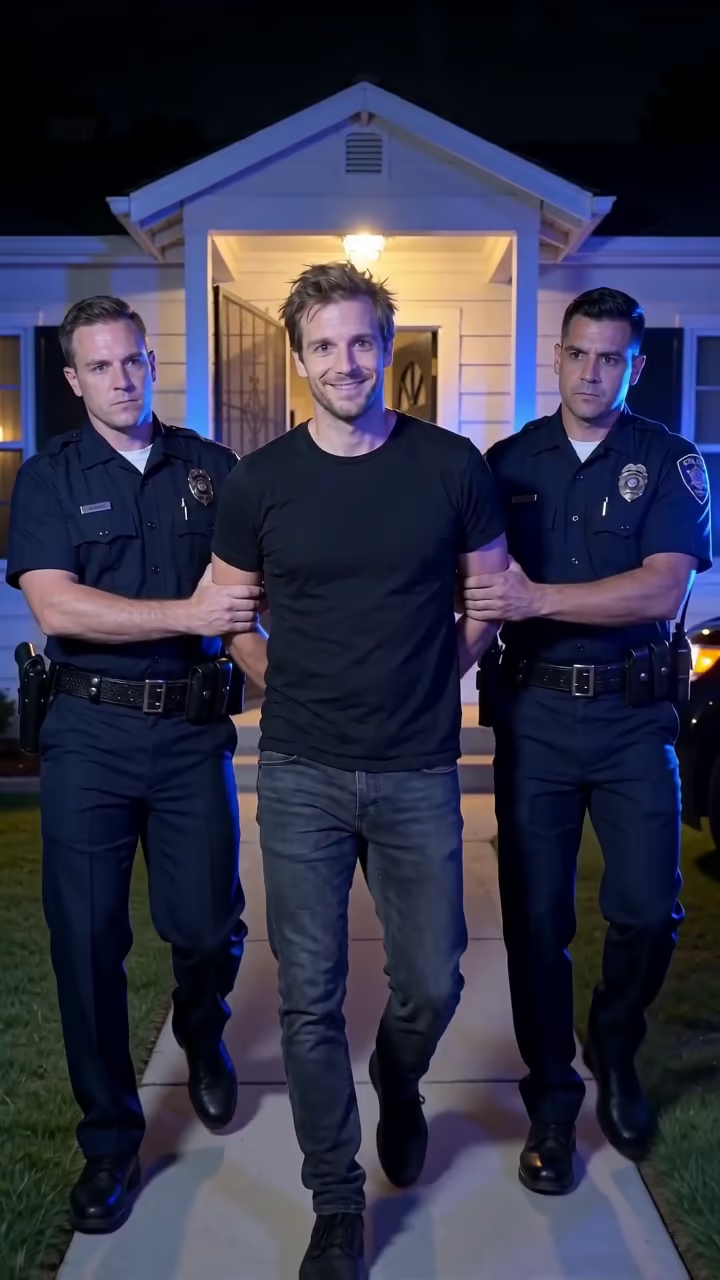
The AI police arrest template turns a normal photo into a short, obviously comedic arrest clip. It starts at the front door of a suburban house at night. Two uniformed officers hold your arms, your hands are cuffed behind your back, and red and blue lights flash across the white siding. The camera walks backward ahead of you as you are led down the porch steps and along the path. Halfway down, you look straight into the lens, grin wider, raise your eyebrows and give a small smug nod, as if whatever you did was completely worth it.
The format took off on TikTok in autumn 2026, usually captioned with something petty: eating the last slice, finishing a show without your partner, leaving the group chat on read. The joke is the contrast between the serious setting and the unbothered grin. The 6-second clip comes with generated audio, an eerie music-box melody with footsteps and police radio, and you can swap in a trending sound.
Behind the button are two steps: an image model builds the doorway scene from your photo, then a video model animates the walk. It takes about two to three minutes, and the video has no watermark. Keep it a joke: use your own photo or one of an adult who agreed, and never post it as real footage. The examples here use AI-generated fictional people.
Keep it obviously a joke
A realistic arrest video can cause real trouble if it is mistaken for real footage: it can hurt someone's reputation, worry family members or be reported. The template is built to be playful, with the person grinning and nodding at the camera, but how you post it matters too.
Use it on yourself or on adults who said yes. Add a caption or label that makes it clear it is an AI edit. Do not use it to accuse a real person of a crime, to scare someone, or to impersonate the police. Badges and text are kept unreadable in the scene, and the officers are generic.
How the shot is built
The start frame matters most for this effect. Early tests that began halfway down the path gave a stiff walk, so the template starts you right at the open front door, on the porch steps, with the path leading toward the camera. From there the video model has a clear route: down the steps, along the path, toward a camera that keeps moving backward.
The red and blue lights are written into both steps, so they wash over the house, the lawn and your face throughout. A police car may come into view at the side near the end.